RUNTIME · WORDPRESS
The WordPress Runtime.
A small plugin that enrols a site, reports what the application is, and tells the console what changed. It observes and reports; the console is where the work happens.
INSTALLATION · ENROLMENT
Download, activate and connect.
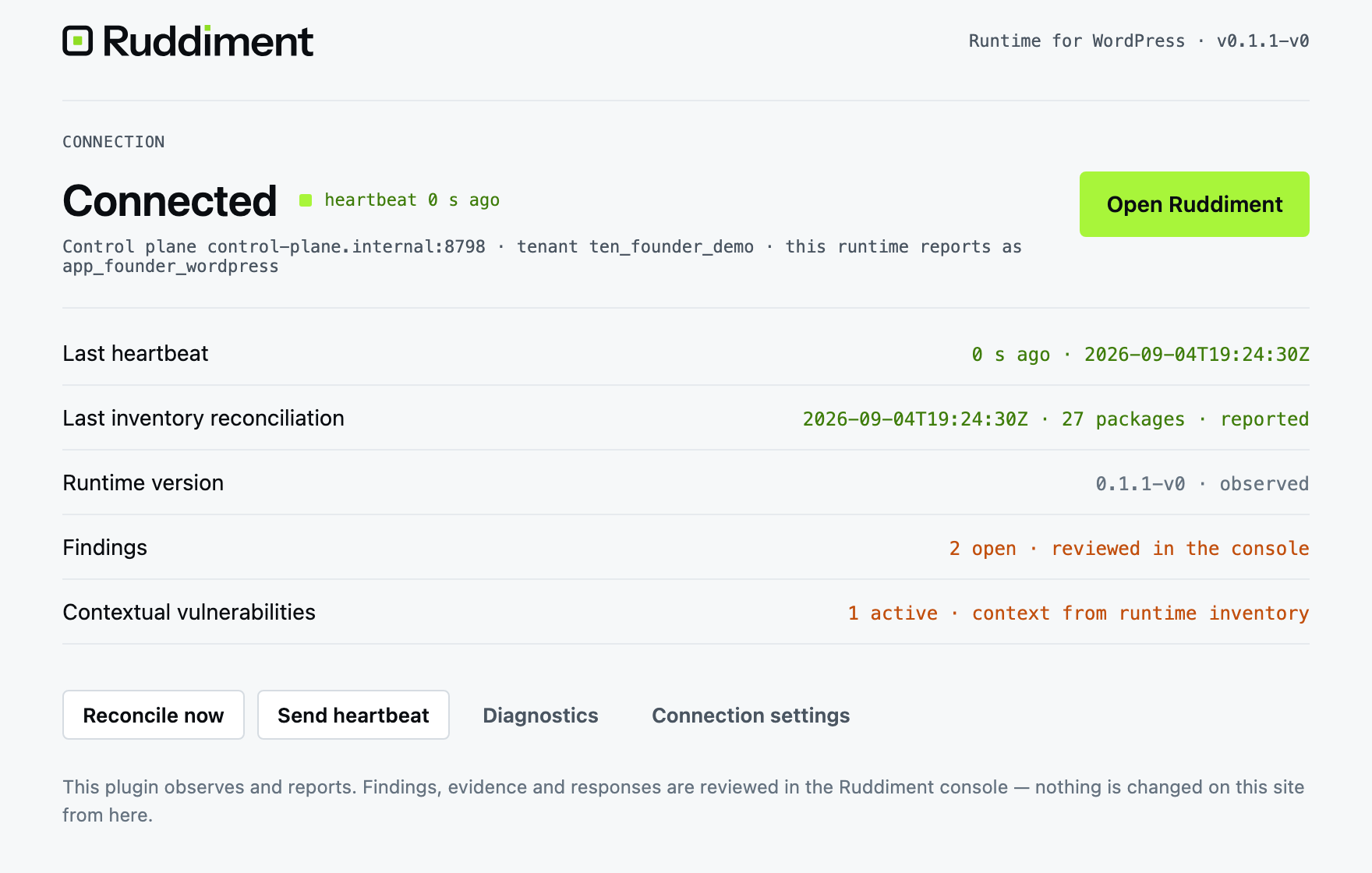
Add your website in Ruddiment and download the Runtime ZIP. In WordPress, choose Plugins → Add New → Upload Plugin, install and activate it. Open Ruddiment, paste the one-time connection code from your dashboard and select Connect website. Your dashboard shows Connected once data arrives.
CONNECT WORDPRESS · FOUR STEPS
- Install plugin Upload the Runtime package in WordPress admin.
- Activate Activate the plugin, then open Ruddiment in the WordPress menu.
- Connect website Copy the short-lived, single-use code from your Ruddiment dashboard and paste it into the plugin.
- First data received Keep your dashboard open. Once Connected appears, review your real plugin and theme inventory.
WHAT IT OBSERVES
Environment, components, changes, identities, heartbeat.
- Environment — WordPress, PHP, host
- Components — core, plugins, themes, must-use plugins, versions
- Changes — component, version and environment changes between reconciliations
- Privileged identities — administrators and capability changes
- Heartbeat · inventory reconciliation · connection state
LIGHTWEIGHT OPERATION
Designed to observe, not to interfere.
The Runtime reads state and reports it. It does not proxy traffic. Managed updates are disabled in the hosted beta; it does not automatically change your plugins. During an outage it retries delivery within bounded local storage; the console shows delayed or missing observations.
Performance figures will be published from measurement, not estimated. None are claimed for the private beta.
SECURITY MODEL
Identified, signed, minimal.
Each Runtime holds its own cryptographic identity, signs its telemetry to the control plane, and minimises data by default — the console receives what it needs to assess the application, not the application's content.
See the Security page for the full architecture description.
SecuritySUPPORTED VERSIONS
Check your WordPress and PHP versions.
Runtime requires WordPress 6.5+ and PHP 8.1–8.4 with sodium enabled. PHP 8.4 requires WordPress 6.7+. Tested combinations are checked for every release; ask the founder to confirm your site before installation.
An unsupported environment is rejected during activation with guidance; do not bypass the compatibility check.
OPEN IN RUDDIMENT
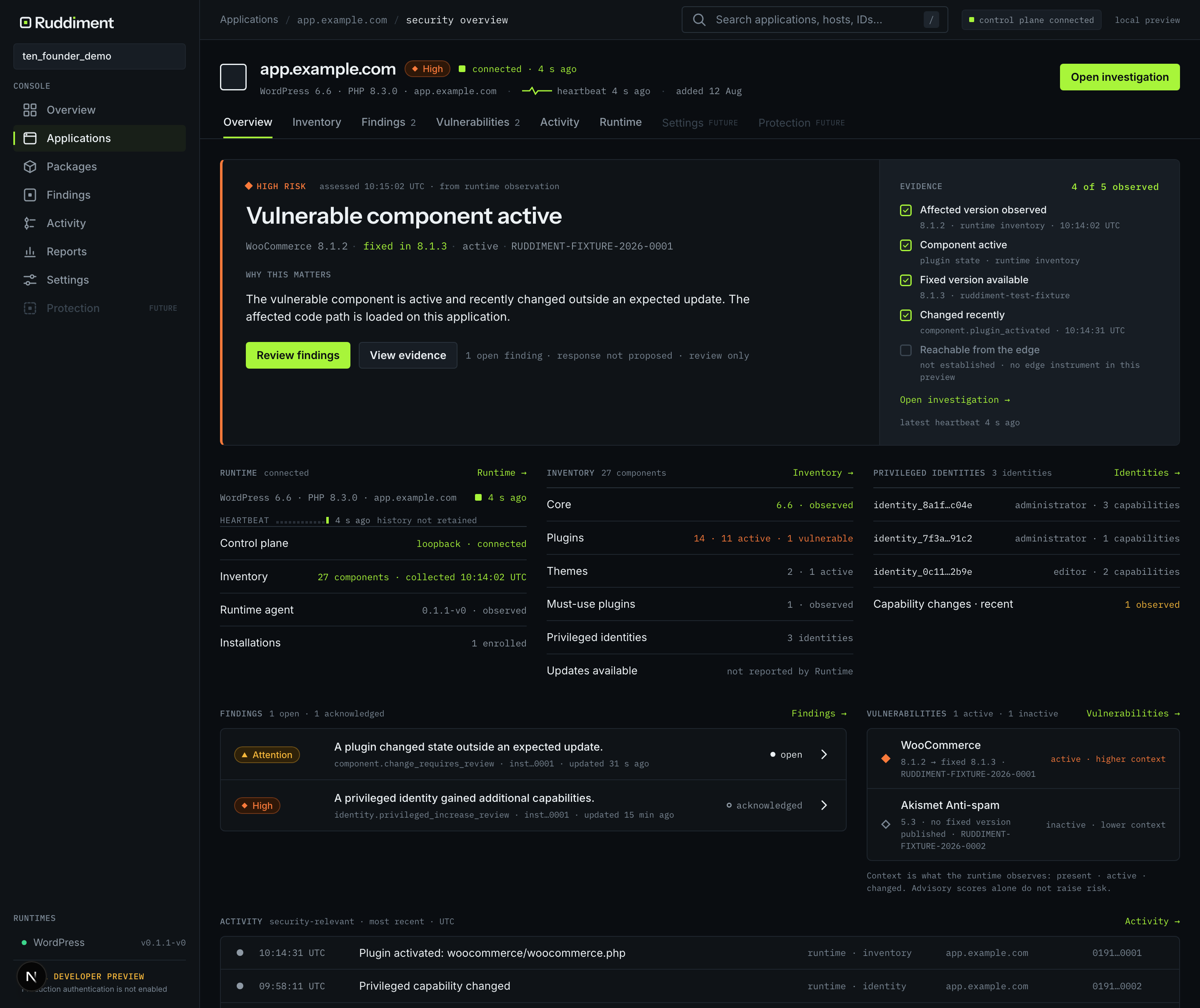
One click from the plugin to the application in the console.
The plugin page shows connection, last heartbeat, last reconciliation, findings and contextual vulnerabilities — and one primary action: Open Ruddiment.
PRIVATE ALPHA · WORDPRESS
See what your application is actually doing.
Start with one WordPress application. Arrange founder-assisted access, complete account security and connect one authorised WordPress website.
30 days. 1 application. No card required.